
How to sell your eBook
An eBook is a lovely way to help families you may never speak to, for example a guide to gentle sleep for the first year. Here are three ways to deliver it after purchase.
You will need a funnel with an order form, and your eBook.
- Attach the file to an email.
- Send a download link in an email, which keeps the email light and helps deliverability.
- Add a download link to your thank you page.
1. As an email attachment
Add a tag:
- Open your payment page and choose Digital product as the offer type.
- Click + to create a product and name it.
- Click + to add a resource, choose Tags and pick a tag, for example eBook buyer.
- Click Save. Add a price plan too. See How to create and configure a price plan.
Send the email:
- Create an automation rule with the trigger New sale.
- Click + to add the action Send email, then the smaller + to write the email.
- Open the Attachments tab and upload your eBook. Attachments can be up to 5 MB. They show as links at the bottom of the email.
- Click Save rule.
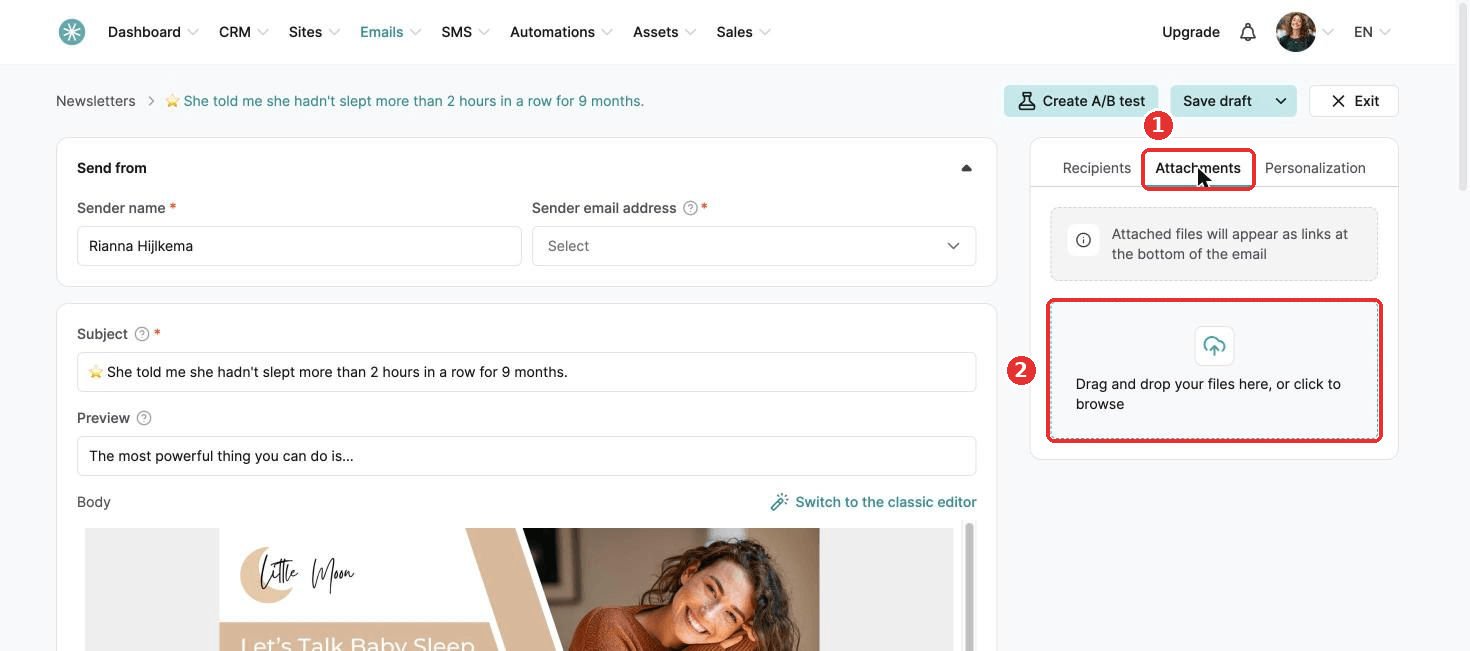
Every buyer now gets the tag and an email with your eBook.
2. As a download link in an email
Upload your eBook to a storage service, such as Google Drive, OneDrive or Dropbox, and put the link in your email.
3. On your thank you page
Did this answer your question?