
How to set a sales limit on your offers
Running a limited offer, such as 10 spots for a holiday sleep package? Set a sales limit, and send people to another page once it is full.
- Go to Sites, then Sales funnels, and open your funnel.
- Open your payment page and click the arrow next to Sales limit.
- Enter the maximum number of sales.
- Under Funnel step to redirect to once the sale limit has been reached, choose a step, such as a waiting list page.
It saves automatically.
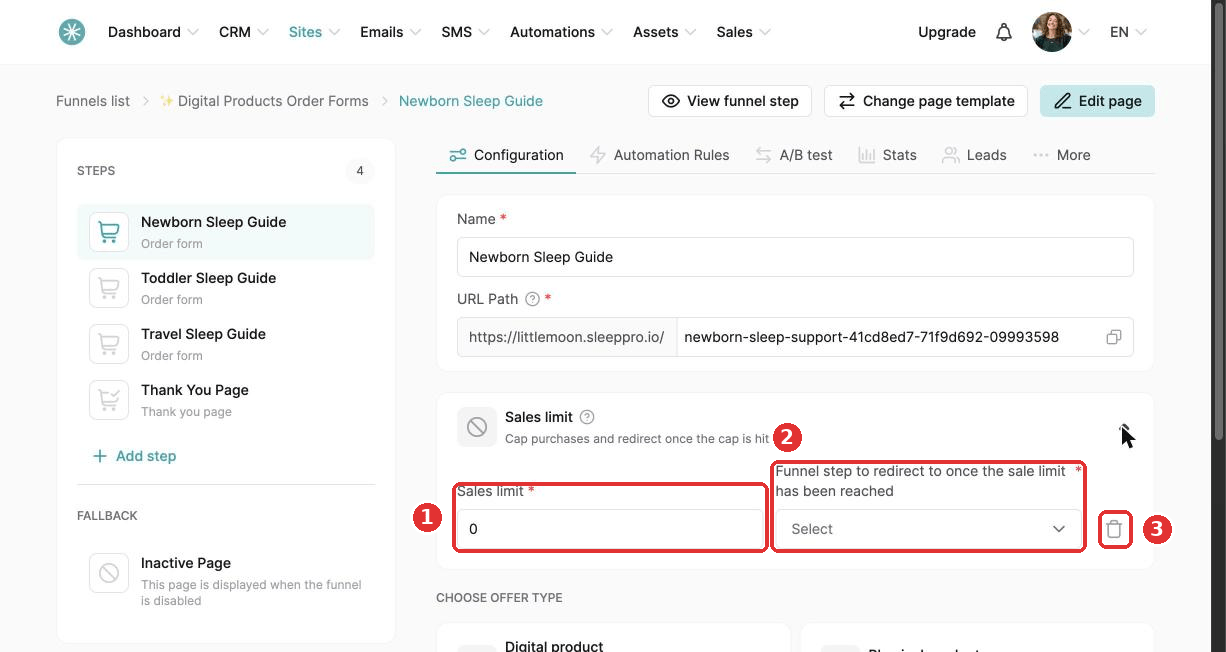
To remove the limit, click the trash icon and Confirm.
The limit covers all price plans of the offer: one-time, subscription and payment plan.
For physical products, each order counts as one sale, whatever the quantity.
You receive an email when the limit is close and when it is reached.
Did this answer your question?