
How do you control access to subscription resources?
Here is how to decide when a parent gets access to a subscription or payment plan, such as your sleep support membership: straight after ordering, or once their first payment arrives.
The default
By default, parents get access as soon as they order a subscription, even before the payment arrives. Some payment methods, such as PayPal or GoCardless, take up to 7 days to process. Instant access means parents who did pay are not left waiting.
This also means a parent can get access even if their first payment fails. Failed first payments are retried over the following days.
Give access only after the first payment
- Click your profile picture, then Settings.
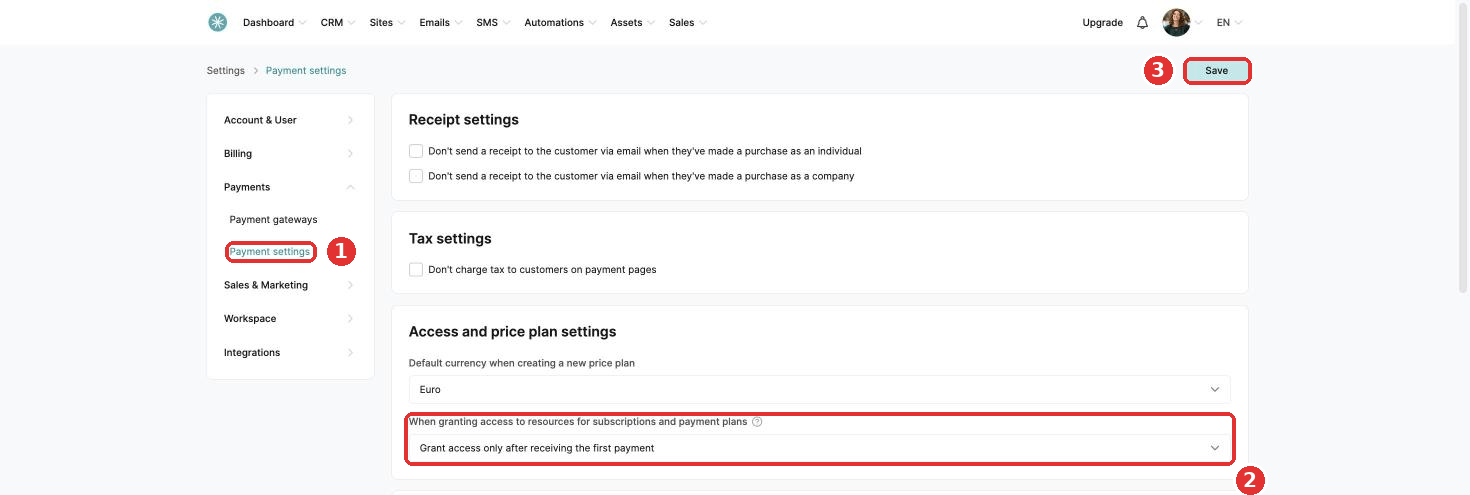
- Click Payments, then Payment settings.
- Under Access and price plan settings, find When granting access to resources for subscriptions and payment plans. Choose Grant access only after receiving the first payment.
- Click Save.
Did this answer your question?