
How to sell an ebook with a VAT rate of 5.5%
In France, eBooks have a reduced VAT rate of 5.5%. Here is how to sell your eBook with this rate.
Step 1: create the product
- Go to Assets, then Physical products, and click Create.
- Set the VAT rate to 5.5% and fill in the other details. See How to create and sell a physical product with SleepPRO™.
- Save.
Step 2: sell it
You need a sales funnel with a payment page. See How to create a funnel and How to create an order form or payment page.
- Open your order form page.
- Scroll down and choose Physical product as the offer type.
- Choose your eBook and click Save.
- Click Edit page.
- From the Payment section on the left, drag the Physical product element onto the page. Your product details show automatically.
- Drag the Offer price element onto the page.
- Click Save at the top right. The editor does not save automatically.
Step 3: send the eBook by email
- On your payment page, in the Automations section, create a rule with the trigger New sale and the action Send email.
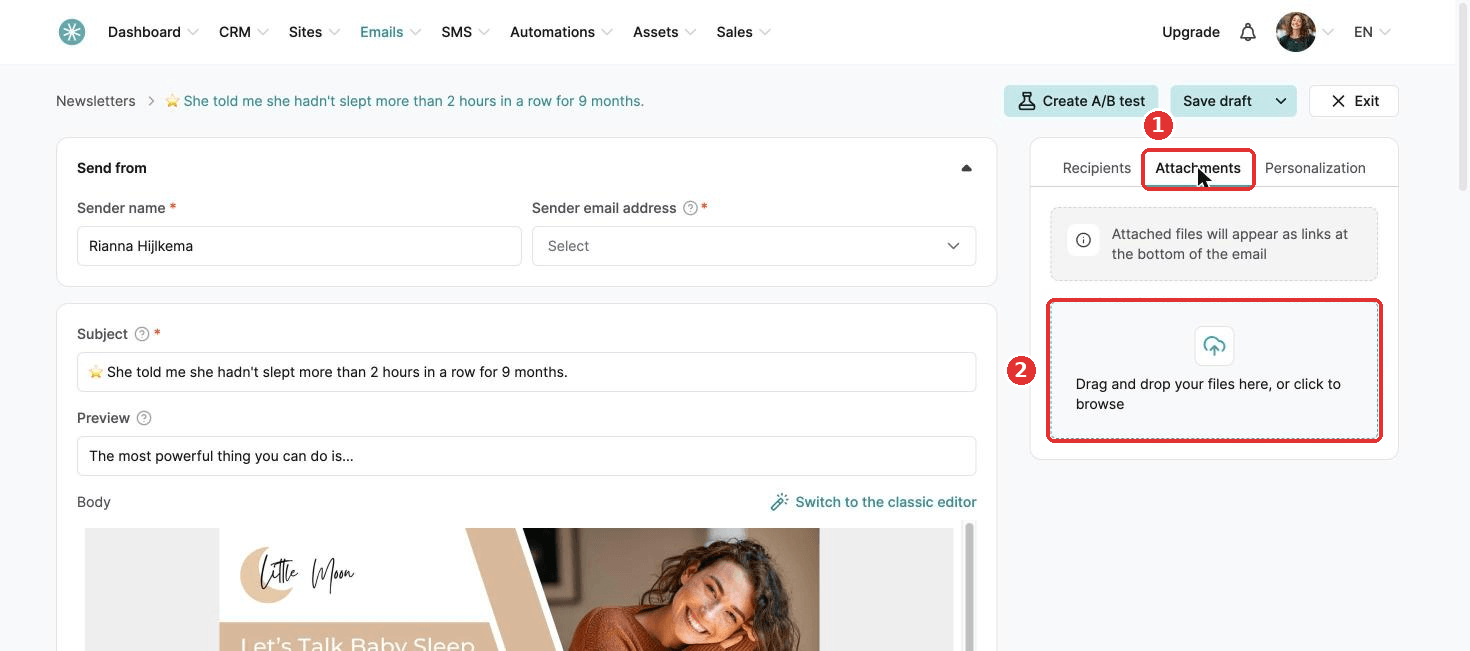
- Click + to write the email.
- Open the Attachments tab and upload your eBook. Attachments can be up to 5 MB. They show as links at the bottom of the email.
- Click Save rule.
Buyers now receive your eBook by email straight after purchase.
Did this answer your question?