
How to set up Google Analytics on your SleepPRO™ pages
Google Analytics shows you how parents find and use your pages: how many visit, where they come from and what they read. It is free. Set it up early, so the data is there when you need it.
Why set it up
- See which pages, blog posts and Instagram links bring you visitors.
- Spot pages parents leave quickly, so you know what to improve.
- Measure your marketing, such as a giveaway or a new freebie, with numbers instead of guesses.
1. Create your Google Analytics property
- Go to analytics.google.com and log in with your Google account.
- Click Start measuring. Already have an account? Click Admin, then Create, then Property.
- Enter an account name, such as your business name, and click Next.
- Enter a property name, choose your time zone and currency, and click Next.
- Fill in your business details and goals, click Create and accept the terms.
- Choose Web as your platform.
- Enter your website address, such as yoursleepbusiness.com, and a stream name. Click Create stream.
- Click View tag instructions, then Install manually, and copy the Google tag. Your measurement ID inside it starts with G-.
2. Add the tag to SleepPRO™
On all your funnels at once:
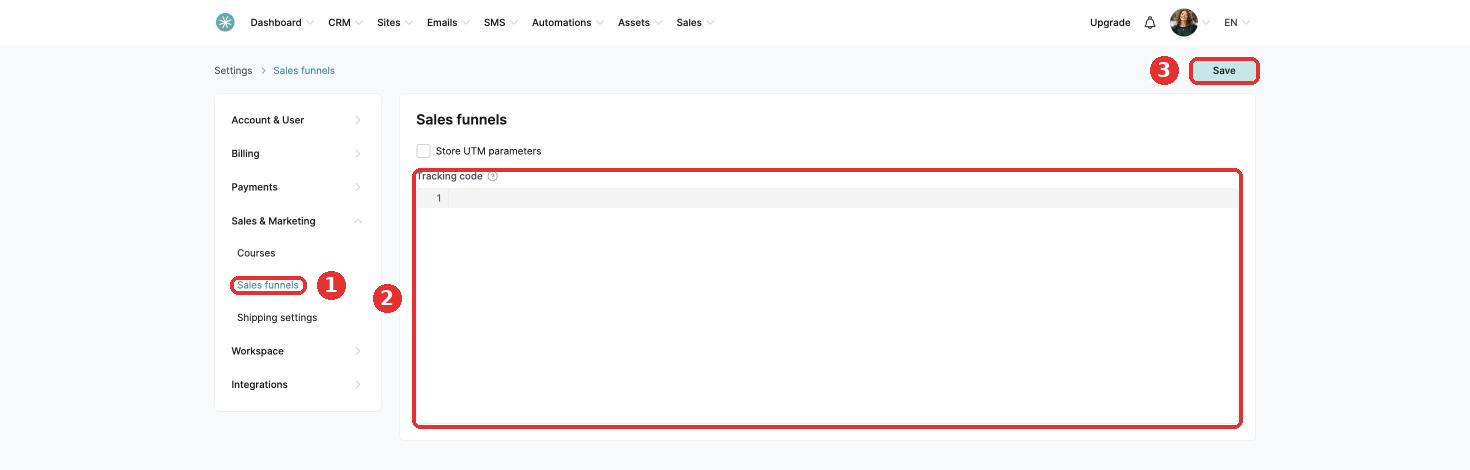
- Click your profile picture, then Settings, then Sales & Marketing, then Sales funnels.
- Paste the Google tag in the Tracking code box and click Save.
On one page only:
- Open the page and click Edit page.
- Click Settings, scroll to Tracking and click Edit header code.
- Paste the Google tag and save the page.
On your Link in bio store: open it, click the Settings tab and paste the tag in the tracking code field.
3. Check it works
- Open one of your pages in a new browser tab.
- In Google Analytics, go to Reports, then Realtime. Your visit shows within a minute or two.
Your standard reports fill up after 24 to 48 hours.
Add the tag in one place per page. A tag on all funnels plus the same tag on a page counts each visit twice.
Google Analytics uses cookies. Working with families in the EU or the UK? Add a cookie banner too. See How to set up a GDPR compliant cookie banner.
Did this answer your question?