
How to integrate Xendit with SleepPRO™
Here is how to connect Xendit, for selling in Indonesia or the Philippines.
You will need a Xendit account.
1. In SleepPRO™
- Click your profile picture, then Settings.
- Click Payments, then Payment gateways, then Connect next to Xendit.
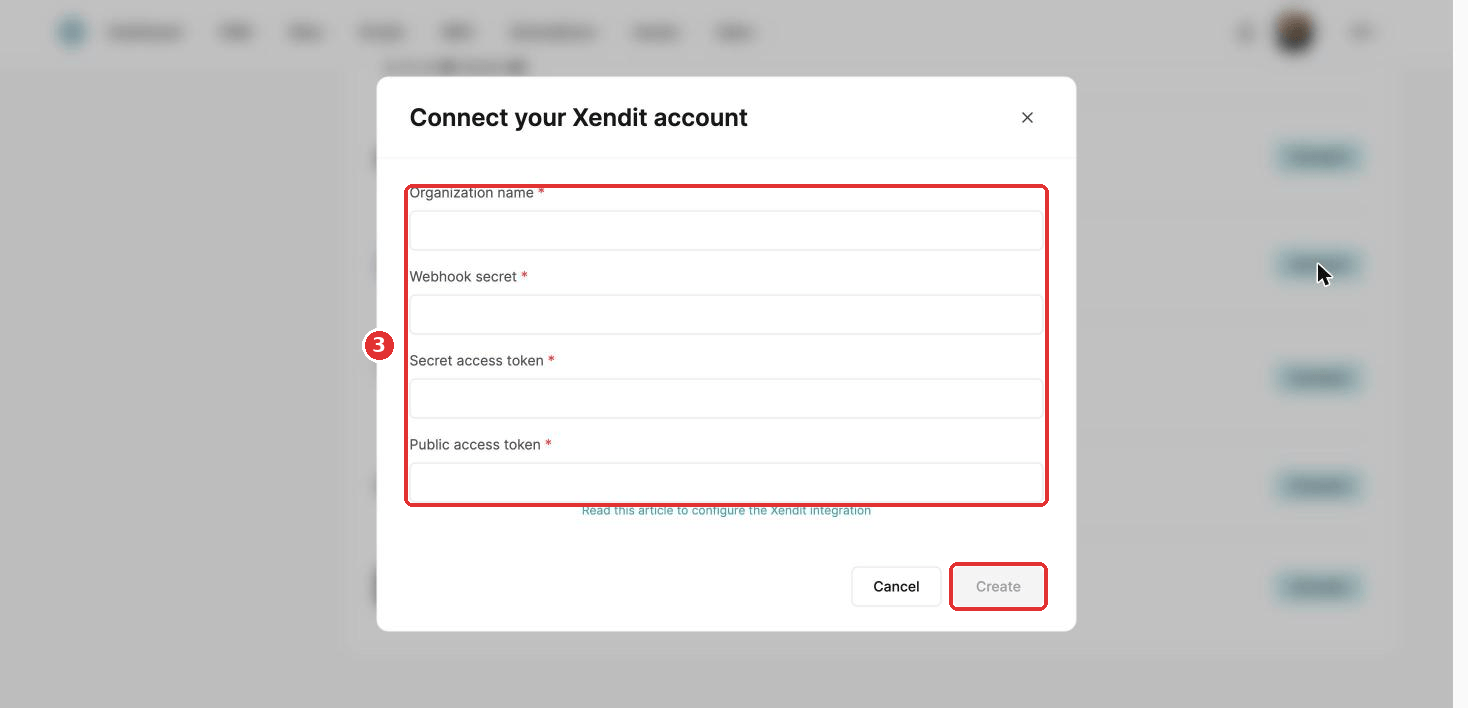
- The popup asks for your organization name, webhook secret and public and secret access tokens. Find these in Xendit, then fill them in and click Create.
2. In Xendit
API keys:
- In the left sidebar, click Settings, then Developers under Setup & Integration.
- Click + Generate secret key, choose the permissions in the popup and click Generate key. You may need to enter a 6-digit code sent to you.
- Copy your public key with the Copy button under Public key.
Your live secret key starts with xnd_production. It shows only once. If you lose it, delete it and generate a new one.
Your public key starts with xnd_public.
Webhooks:
- On the same Developers page, scroll to Webhooks.
- Click Enable auto-retry for failed webhook, so failed notifications retry automatically.
- Click View Webhook Verification Token, enter your password and click Confirm.
- Copy the token and paste it into your Xendit settings in SleepPRO™.
3. Currencies and restrictions
Xendit Indonesia:
- Buyers: Indonesia. Subscriptions: yes. Currency: IDR.
- Your Xendit account must be registered in Indonesia.
Xendit Philippines:
- Buyers: Philippines. Subscriptions: yes. Currencies: PHP and USD.
- Your Xendit account must be registered in the Philippines.
When a payment fails
After the first attempt, Xendit tries three more times, 7 days apart. You cannot change this delay.
Did this answer your question?