
How to integrate ActiveCampaign with SleepPRO™ (coming soon)
Coming soon. The ActiveCampaign integration is not available in SleepPRO™ yet. This guide shows how it will work.
You can connect ActiveCampaign to SleepPRO™ to sync your contacts and tags.
This is optional. SleepPRO™ includes everything you need to email parents.
You will need an ActiveCampaign account with its API turned on.
Connect ActiveCampaign
- Click your profile picture, then Settings.
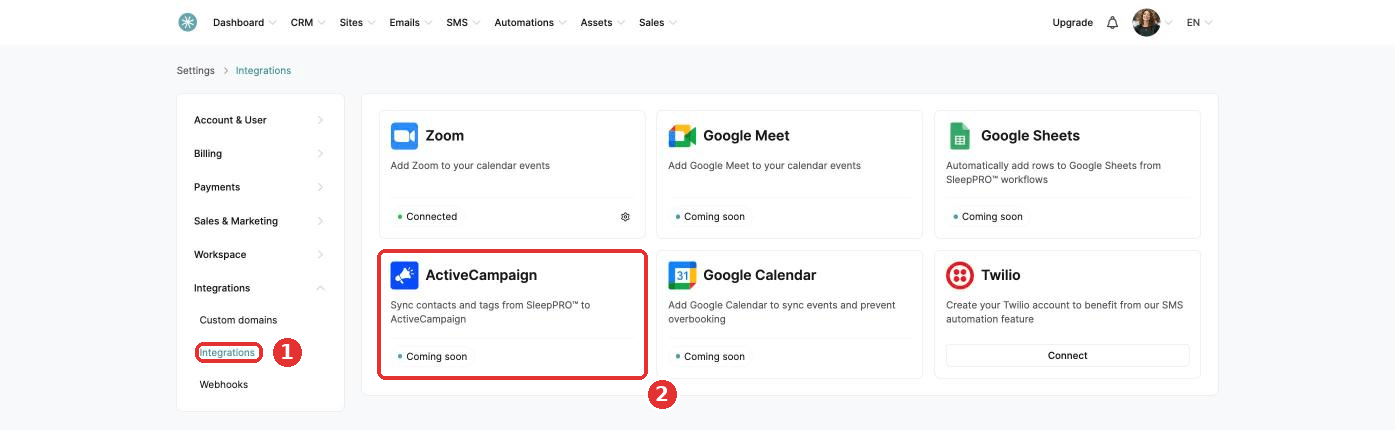
- In the left menu, open Integrations and click Integrations, then ActiveCampaign.
- Make sure your API is turned on in ActiveCampaign. ActiveCampaign's own help pages explain how to turn it on and find your API URL and key.
- Tick Activate, then enter your API URL and API key.
- Choose your triggers and click Save.
How it works
Three triggers are available:
- Contact created.
- Tag added to contact. A tag which does not exist yet in ActiveCampaign is created there for you.
- Tag removed from contact.
Your contacts and their SleepPRO™ tags sync to your ActiveCampaign contact list.
The sync only goes one way. Changes made in ActiveCampaign do not come back to SleepPRO™.
If you reset your API key in ActiveCampaign, update it in your SleepPRO™ settings too.
Did this answer your question?